注: 建议图片大小150px*50px
Views: 0 Author: Site Editor Publish Time: 2026-10-10 Origin: Site
High-resolution cameras and massive NVR storage are useless if the display hardware bottlenecks the system. You might invest thousands in advanced optics and robust network infrastructure. Yet, a subpar screen renders those upgrades practically invisible. You cannot analyze what you cannot clearly see.
Unlike standard PC displays, security monitors must endure relentless continuous operation without failing. They must actively resist permanent image burn-in caused by static camera grids. Furthermore, they need to provide accurate color reproduction. This accuracy remains crucial for precise evidence analysis during critical incidents.
Selecting the right cctv monitor requires matching screen size, resolution, and panel technology to your specific security environment. We will explore how to align these commercial displays with your existing DVR or NVR setups. You will learn to navigate connectivity standards, pinpoint optimal size requirements, and ensure long-term hardware reliability.
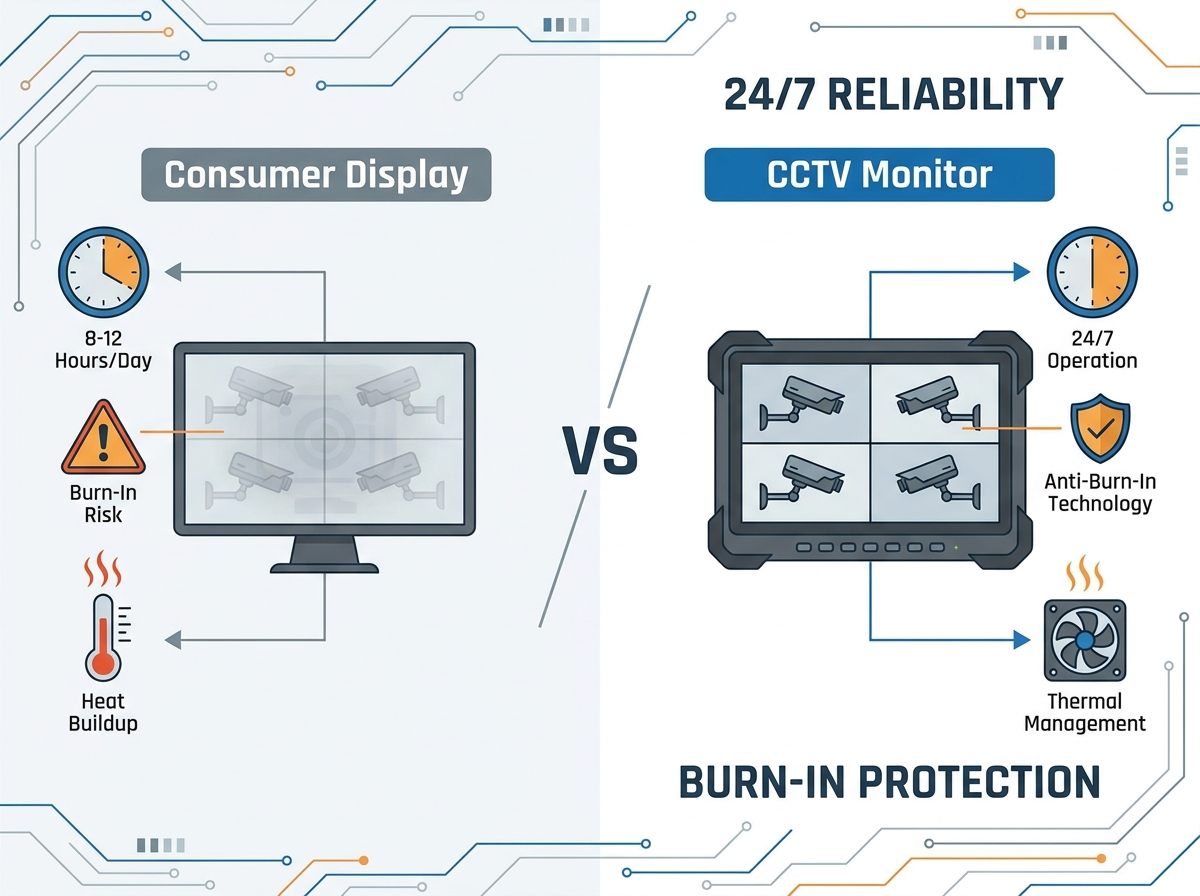
Purpose-Built Reality: Consumer-grade displays lack the thermal management and anti-burn-in features required for continuous security surveillance.
Size to Application: A CCTV Monitor 10 inch fits retail point-of-sale setups, while a CCTV Monitor 24 inch is the baseline for multi-channel control rooms.
Resolution Matching: Upgrading to a CCTV Monitor 4K is only cost-effective if your cameras and NVR natively support and output 4K video.
Connectivity: Professional setups require specialized inputs (like BNC for legacy analog) and VESA mounting capabilities for ergonomic viewing.
Standard consumer monitors target typical office environments. Manufacturers design them for eight to twelve hours of daily use. Pushing these screens beyond their intended limits degrades their internal components rapidly. Capacitors swell, and backlights dim prematurely. CCTV monitors utilize industrial-grade components. Engineers build them specifically for continuous uptime. They feature higher Mean Time Between Failures (MTBF) ratings. A commercial security display easily handles 8,760 hours of operation annually. This endurance prevents sudden blackouts during critical monitoring periods.
Security interfaces rely on static grids. Camera feeds often display fixed timestamps, borders, and stationary backgrounds. Displaying these static elements on standard panels causes permanent ghosting. This phenomenon ruins the screen permanently. Professional monitors combat this issue directly. They incorporate pixel-shifting technology. This software micro-adjusts the image periodically. The human eye cannot detect these minor shifts. However, the movement prevents specific pixels from locking into one color. Specialized LED and LCD panels also resist image retention better than their consumer counterparts.
Heat destroys electronics faster than any other environmental factor. Security control rooms frequently lack optimal airflow. Racks of servers and NVRs generate substantial ambient heat. Consumer monitors utilize thin plastic casings. They prioritize sleek aesthetics over airflow. Security monitors feature heavy-duty housing. They incorporate advanced heat dissipation designs. Vents expel trapped heat efficiently. Internal heat sinks draw thermal energy away from sensitive circuitry. This superior thermal management drastically reduces component failure rates in poorly ventilated spaces.
Space constraints dictate hardware choices. Confined spaces demand smaller screens. A CCTV Monitor 10 inch serves perfectly in these scenarios. You will find them at reception desks. Retail checkout kiosks use them to deter theft visibly. They mount easily on tight wall segments. Field engineers also rely on them heavily. They use battery-powered compact monitors as portable test screens. Installers carry them up ladders. They plug directly into the camera to adjust PTZ functions. This allows precise focus tuning on-site before running cables back to the NVR.
Most small to medium businesses require a reliable middle ground. A CCTV Monitor 24 inch represents the industry standard. It handles four-to-sixteen channel split-screen viewing exceptionally well. The physical dimensions fit easily on standard security desks. It provides sufficient pixel density for crisp 1080p feeds. Operators can identify subjects without leaning uncomfortably close. You avoid crowding your workspace while maintaining excellent situational awareness. Larger screens often require viewers to sit further back. The 24-inch model perfectly balances viewing distance and detail.
Many buyers rush toward ultra-high definition unnecessarily. You should only purchase a CCTV Monitor 4K if your infrastructure supports it. We call this the rule of bottlenecks. A 4K screen displaying a 1080p signal offers zero improvement. Your camera sensors must capture true 8MP video. Your NVR must output a native 4K signal. When matched correctly, the benefits become immense. Digital zoom relies entirely on pixel count. High resolution maintains facial clarity. You can read license plates clearly while digitally zooming into a specific quadrant during live monitoring.
CCTV Display Size and Application Guide
Screen Size | Optimal Resolution | Primary Application | Viewing Distance |
|---|---|---|---|
7 to 10 Inches | 720p / 1080p | Portable testing, Retail POS, Kiosks | Under 2 feet |
21 to 24 Inches | 1080p | Standard 4-to-16 channel monitoring desks | 2 to 3 feet |
27 to 32 Inches | 1440p / 4K | Wall-mounted multi-channel grids | 4 to 6 feet |
42+ Inches | 4K Ultra HD | Large enterprise command centers | Over 8 feet |
Connectivity dictates compatibility. Modern IP camera NVRs output high-definition digital signals. They utilize HDMI and DisplayPort connections. These inputs handle massive data bandwidth smoothly. Conversely, many facilities still operate legacy analog DVRs. These older systems output analog signals. They require VGA ports or BNC composite inputs. You must audit your recording hardware before purchasing a display. Adapters exist, but they introduce latency. They can also degrade signal quality. A professional monitor provides native ports for your specific equipment.
Visuals only tell half the story in active surveillance. Modern systems frequently employ two-way audio. Guards need to hear environmental sounds. They must communicate with individuals at gates or doors. Built-in monitor speakers simplify this process. They eliminate the need for external desktop speakers. Additionally, BNC loop-through stands as a critical commercial feature. This output port allows you to daisy-chain multiple displays. You plug the camera signal into the first screen. The loop-through pushes that exact raw signal to a second monitor without signal loss.
Security operators spend countless hours observing screens. Poor ergonomics lead to neck strain. Eye fatigue causes missed security events. VESA compatibility requirements remain non-negotiable for professional setups. This standardized hole pattern allows versatile mounting solutions. You can integrate displays into server racks securely. You can utilize articulating arms to adjust viewing angles throughout the shift. Wall mounting clears valuable desk space for keyboards and joysticks. Always verify the exact VESA measurements on the hardware specification sheet.
Common ergonomic mounting solutions include:
Fixed Wall Mounts: Best for large, dedicated multi-channel overview screens.
Articulating Desk Arms: Ideal for single operators needing to adjust angles for glare reduction.
Rack Mount Brackets: Used exclusively in server rooms for IT diagnostics and NVR management.
Ceiling Mounts: Frequently deployed in retail environments above cash registers.
Procurement teams often look for the cheapest option available. Finding a budget CCTV monitor for sale at a consumer electronics store feels like a victory. However, standard screens fail quickly under continuous load. You will likely replace cheap monitors every one to two years. The backlight burns out. The colors fade dramatically. Commercial-grade security monitors require a higher initial outlay. Yet, they offer a verified five-plus year lifespan. They draw less power continuously. They include longer commercial warranties covering burn-in damage.
You must balance the CCTV Monitor screen price against real-world utility. Advanced features carry distinct premiums. Anti-glare coatings cost more but remain essential for brightly lit guardhouses. Ultra-high brightness panels perform better near windows but increase hardware costs. Weigh these premiums against your actual operational needs. Active monitoring requires higher quality hardware. Guards actively scanning for threats need optimal clarity. Passive recording setups differ greatly. If you only check the screen occasionally after an incident occurs, you can safely forego expensive ergonomic enhancements.
Never buy a display blindly. Check your NVR output capabilities before executing a purchase order. Locate the manufacturer specifications for your recording unit. Identify the maximum supported video resolution. Verify the supported frame rate. Some older units output 4K at merely 15 frames per second, causing choppy playback. Matching your monitor capabilities strictly to your NVR prevents overspending. It guarantees a smooth, lag-free viewing experience for the operator.
The physical room dictates the hardware requirements. Measure ambient light carefully. Rooms facing direct sunlight require high-nit brightness displays. Standard monitors wash out entirely under harsh light. You also need anti-glare coatings to prevent reflections. Next, measure your physical desk or wall space accurately. A massive screen sounds impressive. However, it proves useless if it physically blocks the operator's line of sight to a physical doorway or window.
Installation mistakes ruin excellent hardware. Avoid mismatched aspect ratios at all costs. Connecting a 4:3 legacy analog system to a 16:9 widescreen without adjusting settings stretches the image. Vehicles look disproportionately long. Suspects appear wider than reality. This distortion ruins forensic evidence. Furthermore, ensure adequate cable shielding. Installers sometimes run long HDMI or VGA cables directly alongside heavy power lines. This causes electromagnetic interference. The screen displays rolling lines or static. Always cross power lines at a ninety-degree angle to maintain pure signal integrity.
Follow these numbered steps during installation:
Verify the power source utilizes an Uninterruptible Power Supply (UPS) to prevent surge damage.
Connect the video cables firmly, ensuring locking screws on VGA/DVI ports tighten fully.
Access the NVR settings and adjust the output resolution to match the monitor's native display exactly.
Enable the monitor's pixel-shifting or anti-burn-in features through the internal on-screen display menu.
Adjust the physical tilt to minimize glare from overhead fluorescent lighting.
Summary: Effective surveillance requires an end-to-end approach where the monitor is as robust as the cameras capturing the footage.
Final Recommendation: Choose compact 10-inch screens for tight spot-monitoring. Deploy 24-inch 1080p monitors for standard business desks. Reserve expensive 4K displays exclusively for high-end IP systems requiring deep digital zoom capabilities.
Call to Action: Evaluate your NVR's output specs carefully today. Contact our security integration team to match your system with the correct commercial-grade display.
A: While physically possible via HDMI, TVs are not designed for static images. They will suffer from severe burn-in quickly. They also face potential thermal failure if left on 24/7. Consumer televisions lack the necessary cooling mechanisms and industrial capacitors required for continuous surveillance.
A: Yes, but only if your cameras record in 4K and your NVR can output a true 4K signal. Otherwise, the monitor simply upscales a lower-resolution image. This provides no extra detail and wastes your hardware budget entirely.
A: A portable, battery-powered monitor used by installers. They typically range from four to ten inches. Technicians use them to test camera angles, adjust focus, and verify PTZ controls directly at the camera site before running cables to the main NVR.
A: A true commercial-grade CCTV monitor provides extreme durability. Engineers rate them for 50,000 to 100,000 hours of continuous use. This translates roughly to between five and eleven years of non-stop, 24/7 operation before backlight failure occurs.