注: 建议图片大小150px*50px
Views: 0 Author: Site Editor Publish Time: 2026-10-15 Origin: Site
Standard TVs are cheaper and easier to buy today. This makes them highly tempting for new surveillance setups. Many buyers quickly grab a flat-screen from a local electronics store to view their cameras. You might completely overlook the hidden risks of using consumer-grade displays for continuous security feeds. They often suffer from sudden hardware failure. They experience permanent image retention very quickly. Consumer screens also struggle to render low-light footage accurately, blurring critical details.
A standard TV might suffice for casual home monitoring. You only turn it on occasionally to check a notification. However, enterprise and commercial environments require a dedicated cctv monitor. These professional units are engineered for strict 24/7 reliability. They handle specific video processing tasks perfectly. They never overheat during constant use. Investing in professional displays ultimately secures your facility's operational integrity.
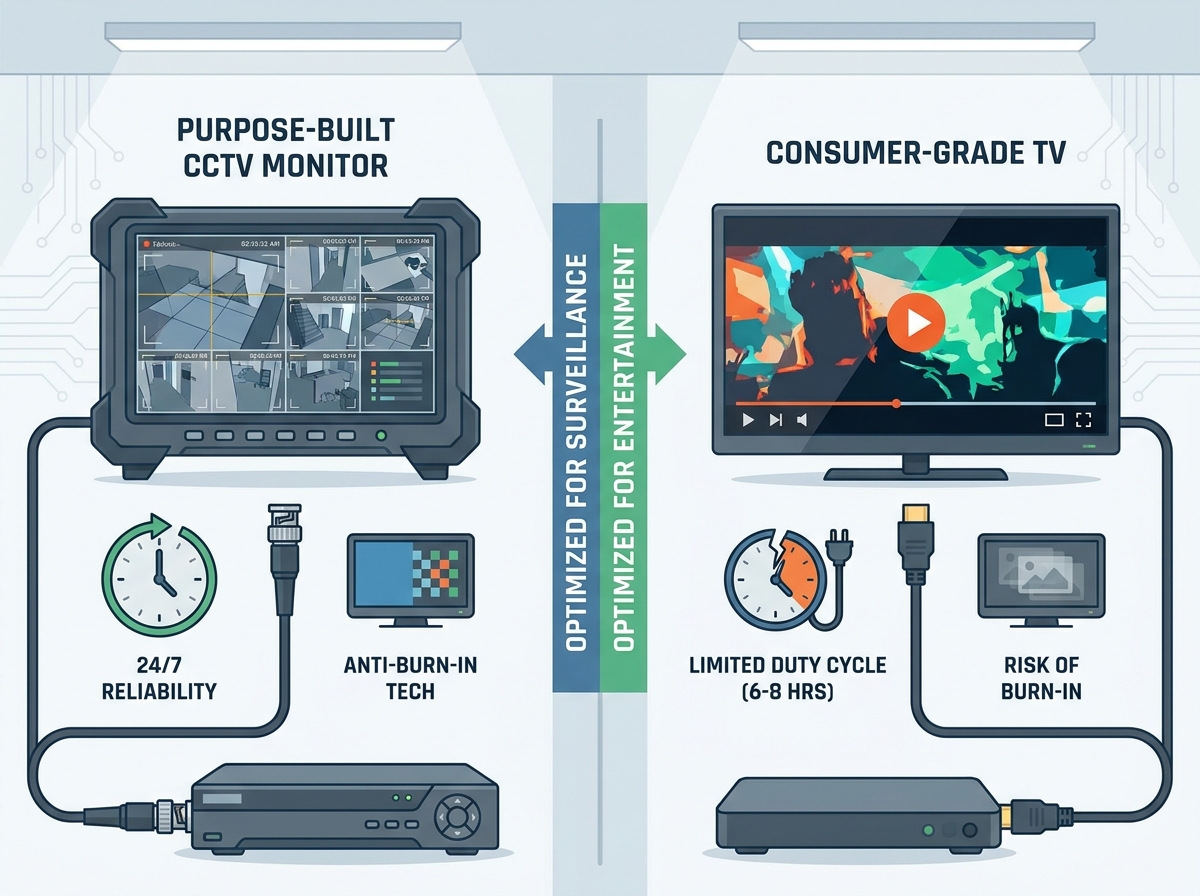
Duty Cycle: Dedicated CCTV monitors are built for 24/7 continuous operation, whereas standard TVs are engineered for 6–8 hours of daily use.
Burn-In Prevention: Surveillance feeds are highly static; purpose-built monitors use specific technologies (like pixel shifting) to prevent permanent screen burn-in.
Hardware Compatibility: CCTV screens offer specialized inputs (BNC, VGA) designed to interface directly with commercial DVRs/NVRs without signal degradation.
Total Cost of Ownership: Despite a higher initial *CCTV Monitor screen price*, commercial monitors offer better ROI due to longer lifespans and commercial warranties.
Consumer electronics look great in a living room. They fail quickly in a security control room. The hardware differences between the two are vast and highly impactful.
Consumer TVs use standard commercial-grade capacitors. They rely on basic power supplies. These standard components overheat rapidly when left on constantly. A standard television is engineered for about six to eight hours of daily use. It expects long periods of downtime to cool off. Security control rooms operate continuously. Industrial-grade monitors use heavy-duty components. They manage heat dissipation effectively through robust heat sinks. They run 24 hours a day without dangerous thermal buildup. We often see standard TVs fail within their first year in active commercial settings.
Many buyers ignore the manufacturer's fine print. Using a consumer television for continuous commercial surveillance almost always voids the warranty. Television brands monitor internal usage hours through built-in software. If they detect 24/7 continuous operation, they will reject your repair claim. Professional security displays include robust commercial warranties. These agreements explicitly guarantee continuous operation. They protect your investment over several years.
Televisions enhance cinematic experiences dynamically. They boost colors artificially to make movies pop. They use motion smoothing interpolation to make sports look fluid. These exact features destroy security footage integrity. A security monitor prioritizes raw image accuracy. It delivers exceptional low-light contrast. It renders static images without annoying digital artifacts. You need to see a suspect's exact clothing color realistically. You do not need a digitally saturated image. Motion smoothing can even blur fast-moving objects, like a license plate on a speeding car.
Assuming a premium consumer brand name guarantees commercial durability.
Leaving motion-smoothing features turned on when viewing security footage.
Placing a standard TV in an enclosed rack where it cannot vent heat.
Evaluating hardware requires looking beyond basic screen size. Professional environments demand specific functional dimensions.
Security feeds feature rigid static grid lines. They display constant timestamps in the corner. These unmoving elements cause permanent screen burn-in on normal televisions. You will eventually see a ghost image burned deep into the glass. Security displays utilize specific anti-burn-in technology. They execute microscopic pixel-shifting routines. This imperceptibly moves the entire image by a few pixels periodically. It protects the screen panel from permanent damage. It ensures clear viewing for years without ghosting.
Modern televisions rely almost exclusively on HDMI or DisplayPort connections. Security systems require varied and robust inputs. Commercial monitors feature BNC inputs securely. These handle legacy analog and coaxial setups perfectly without signal loss. They also include looping outputs and VGA ports. This allows direct connections to specialized DVRs. You avoid using fragile aftermarket adapters. You eliminate frustrating signal degradation.
Table 1: Connectivity Comparison
Feature | Consumer TV | Security Monitor |
|---|---|---|
HDMI Inputs | Yes (Multiple) | Yes (Standard) |
BNC Coaxial Inputs | No | Yes (Locking) |
VGA Support | Rarely | Yes |
Looping Video Outputs | No | Yes |
Audio Integration | Built-in speakers | Audio IN/OUT terminals |
Control rooms require tidy installations. Security monitors are typically VESA-compliant right out of the box. They feature extremely narrow bezels. These sit perfectly flush in multi-monitor control room racks. Standard televisions often have bulky frames. They use proprietary, stylized stands. They are notoriously difficult to mount securely in tight security desks. Industrial monitors are built to integrate seamlessly into complex metal racking systems.
Selecting the right size is crucial for operational efficiency. Your screen choice must reflect the physical space and the camera resolution.
Not every environment requires a massive wall of screens. Retail cash registers need compact viewing solutions. Reception desks require subtle monitoring without intimidating visitors. Single-camera entryways function perfectly with a small display. In these tight scenarios, a compact CCTV Monitor 10 inch is the ideal choice. It fits into cramped spaces effortlessly. It provides security personnel with immediate visual verification of visitors. You save valuable desk real estate while maintaining strict situational awareness.
Most security offices operate standard multi-channel setups. Desk distance dictates optimal screen size. Operators typically sit roughly two to three feet away from the glass. Here, the CCTV Monitor 24 inch acts as the industry sweet spot. It comfortably displays four to eight camera channels simultaneously. The grid remains highly legible. Operators can monitor activities for hours without eye strain. It strikes a perfect balance between physical footprint and visual clarity.
Modern surveillance relies heavily on high-resolution cameras. Facilities now deploy 8MP IP cameras regularly. Downscaling this incredible evidence wastes your camera investment completely. A CCTV Monitor 4K becomes strictly necessary in high-density control rooms. It allows operators to view 16 or more feeds simultaneously. Every single grid square retains sharp, native detail. You can zoom into live footage digitally without severe pixelation. This proves vital during active incident tracking.
Match resolution to the recording output of your NVR.
Keep viewing angles in mind; IPS panels offer the best off-center visibility.
Do not crowd small screens with too many grids. Use larger screens for 16-channel layouts.
Budget constraints push many buyers toward cheaper consumer hardware. This approach often costs more money over time.
Standard TVs look like an incredible bargain initially. You might save a few hundred dollars upfront. However, standard TVs suffer a high failure rate in 24/7 commercial environments. Expect them to fail within 12 to 18 months. You will likely buy three standard televisions over a five-year span. A commercial monitor lasts five to seven years easily. The upfront premium pays for itself rapidly. You eliminate the labor costs of constantly replacing broken screens.
You must allocate hardware funds strategically. Screen tiers vary significantly based on durability ratings and physical size. A basic desktop monitor costs less. High-end industrial screens cost substantially more. The average CCTV Monitor screen price reflects its robust internal components. You pay for better heat sinks. You invest in pixel-shifting technology. Always budget specifically for commercial-grade durability. Do not rely on unpredictable consumer discount sales for critical infrastructure.
Shopping for security equipment requires careful vetting. Do not just shop for the lowest listed price. When evaluating a CCTV monitor for sale, look for specific industrial metrics on the spec sheet. Check the MTBF rating closely. MTBF stands for Mean Time Between Failures. A high MTBF (like 50,000 hours) ensures long-term reliability. Verify the commercial warranty terms. Ensure the unit is genuinely VESA compliant. This guarantees a smooth installation process.
Making the right choice depends on your daily operational realities. Use this framework to decide your next purchase.
Standard televisions still have a very specific place. They work reasonably well for basic residential setups. Homeowners mostly use their smartphones for alerts today. They rarely turn on a dedicated security screen. A TV is completely acceptable if you only check footage occasionally. It also works for highly budget-constrained community setups. If your screen displays a security feed for less than eight hours daily, a standard TV survives just fine.
Commercial environments have absolutely zero room for error. Retail stores require continuous floor observation. Industrial facilities demand flawless safety monitoring around heavy machinery. In these scenarios, professional displays are strictly mandatory. Any setup requiring 24/7 continuous display needs industrial hardware. Operations requiring strict legal compliance must avoid consumer TVs. Liability monitoring demands uninterrupted recording and viewing capabilities. Equipment failure poses a direct, immediate security threat here.
Your ultimate decision comes down to duty cycle and critical reliability. How long will the screen remain powered on every day? You must weigh the criticality of the footage being monitored. Casual viewing permits consumer hardware. Critical security setups demand purpose-built commercial reliability.
Before purchasing your next display, audit your current NVR output resolutions. Check your available hardware ports to ensure compatibility. Make sure you match your new display precisely to your existing security infrastructure. Planning ahead guarantees a seamless, reliable surveillance setup.
A: PC monitors are generally better than standard TVs. They handle sharp static text much better. However, they still lack industrial 24/7 power supplies. They do not have specialized BNC inputs found on true commercial monitors. They work for temporary desk setups but often fail under continuous operational stress.
A: Lower the brightness and contrast settings significantly. Set up an auto-shutoff timer if continuous viewing is not required. You should frequently change the grid layout on your DVR. This shifts static grid lines and timestamps to different screen areas, extending the panel's lifespan slightly.
A: No, you do not need it for recording. The NVR records full resolution regardless of the screen attached. However, you need one to view the live feed in its native, uncompressed detail. It is highly recommended for forensic analysis and large multi-camera grids.