注: 建议图片大小150px*50px
Views: 0 Author: Site Editor Publish Time: 2026-10-25 Origin: Site
Deploying standard consumer PC monitors or living room TVs for 24/7 surveillance environments is a common, costly mistake. Many buyers assume any screen will work for their camera feeds. This assumption quickly leads to operational failures. Standard displays suffer from severe image retention. Burn-in ruins the panel when you display static security grid feeds continuously. Furthermore, consumer screens lack adequate cooling mechanisms. They overheat easily under continuous operation inside cramped control rooms.
To prevent these failures, you must invest in a purpose-built cctv monitor screen. Dedicated commercial displays ensure continuous uptime. They feature proper legacy and modern connectivity options. They also provide comprehensive commercial warranties. Choosing the right commercial-grade panel prevents frequent replacements. It guarantees your surveillance system functions optimally day and night. Read on to learn how to evaluate specifications, determine appropriate sizing, and find reliable equipment vendors.
Price to Performance: Dedicated security monitors typically range from $150 for basic setups to $800+ for industrial-grade, 24/7-rated displays.
Critical Specifications: Do not evaluate based solely on resolution; prioritize 24/7 reliability ratings, VESA mount compatibility, and legacy/modern port availability (BNC, HDMI, VGA).
Sizing Logic: Match your monitor size to your camera count—a 22-inch screen is adequate for a 4-channel view, while 16+ channels require 32 inches or larger for actionable visibility.
Vendor Selection: Source from suppliers offering commercial warranties (typically 3 years) and B2B volume discounts rather than consumer retail outlets.
Understanding equipment value requires looking past the initial retail tag. Commercial surveillance demands reliability. You need hardware designed specifically for continuous operation. Evaluating the exact monitor price requires a detailed breakdown of your specific operational needs. Different environments dictate different hardware requirements. Let us examine the three primary tiers of surveillance displays.
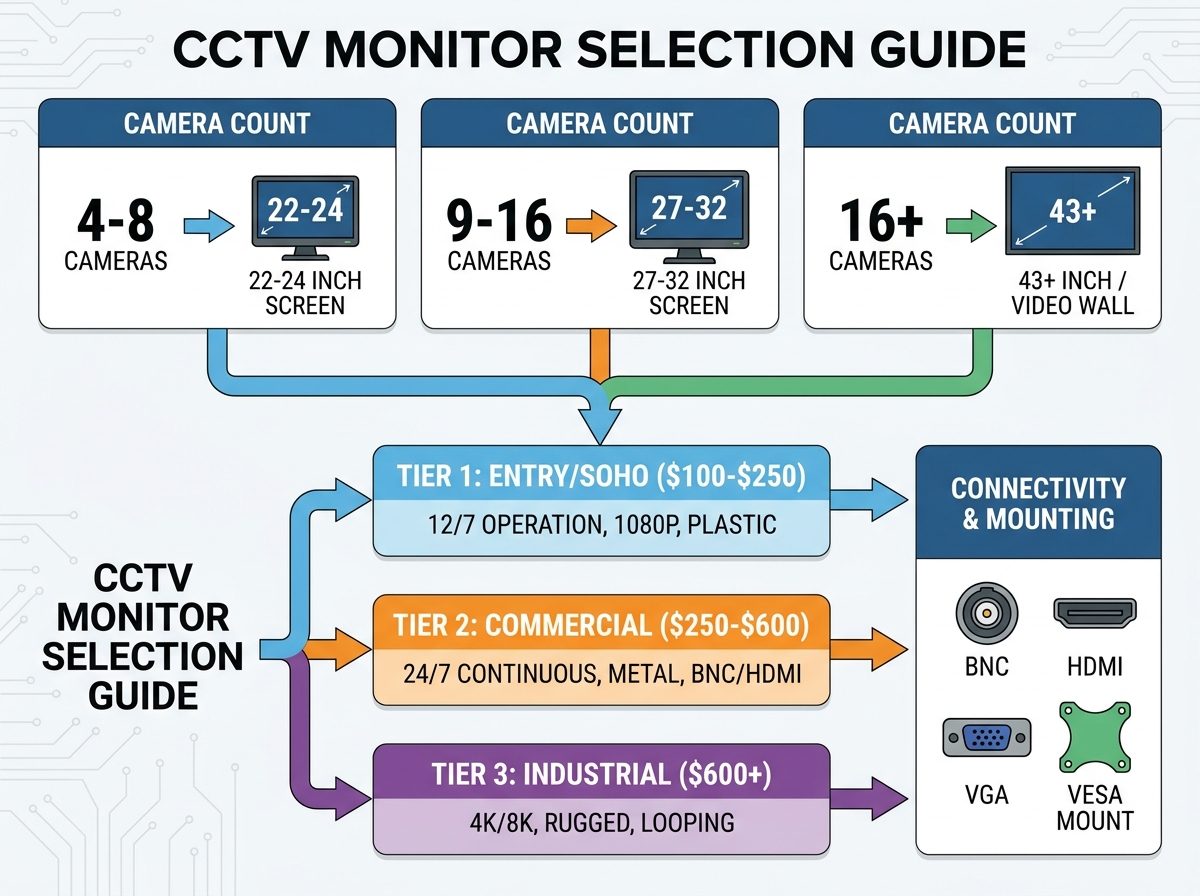
Entry-level models provide basic viewing capabilities. They typically feature 1080p resolution. You will find screen sizes ranging from 19 to 24 inches. They offer standard HDMI and VGA inputs. Manufacturers rate these units for 12/7 operation.
These models work best for small retail shops. Home security DIYers also benefit from them. They suit single-location setups perfectly. Cashier monitoring is a prime example. However, they come with significant trade-offs. The plastic housing traps heat. They suffer from faster degradation if you leave them on 24/7.
Commercial-grade displays represent the industry standard. They offer resolutions from 1080p to 4K. Sizes typically range from 24 to 32 inches. Engineers build these panels specifically for 24/7 continuous operation. Finding a rugged security monitor in this tier ensures long-term reliability. They feature anti-glare panels for brightly lit environments.
Mid-sized businesses rely heavily on this tier. Office buildings and warehouses require this durability level. The value additions are substantial. Metal enclosures provide excellent heat dissipation. They include BNC ports for legacy analog systems. Higher contrast ratios deliver superior night-vision clarity.
Enterprise environments demand industrial-grade solutions. These displays boast 4K or 8K resolutions. They feature ultra-thin bezels for seamless multi-screen matrix setups. Ruggedized housings protect internal components. They also offer advanced looping capabilities.
Enterprise security operation centers (SOCs) utilize these units. Industrial production lines require their extreme durability. We must also note a niche sub-category here. Battery-powered tester monitors usually cost between $200 and $500. Installers use these portable units on ladders. They adjust camera field-of-view before finalizing cable runs.
Performance Tier | Expected Budget | Ideal Use Case | Key Limitation |
|---|---|---|---|
Entry-Level (SOHO) | $100 - $250 | Small shops, residential | 12/7 duty cycle max |
Commercial Grade | $250 - $600 | Warehouses, mid-size offices | Higher initial investment |
Industrial / Video Wall | $600 - $1,500+ | Enterprise SOCs, factories | Requires complex configuration |
Matching physical dimensions to your viewing requirements is crucial. You cannot shrink sixteen camera feeds onto a small display. Doing so destroys actionable visibility. Operators miss critical events. Choosing the correct monitor size directly affects operator response times. You must align your screen dimensions with your grid layout.
4 to 8 cameras: Choose 22 to 24 inches. This maintains clear pixel density per grid box.
9 to 16 cameras: Upgrade to 27 to 32 inches. This prevents eye strain during extended shifts.
16+ cameras: Invest in 43 inches and above. Alternatively, utilize a multi-screen setup for better distribution.
Do not evaluate surveillance displays using standard gaming or PC metrics. The priorities differ entirely. Your focus must remain on reliability and clarity.
First, consider the refresh rate and response time. A 60Hz refresh rate is the standard for CCTV. Most security cameras cap at 30fps anyway. Therefore, prioritize high contrast ratios over ultra-low response times. Contrast helps operators distinguish details in dark, grainy night-vision footage.
Next, evaluate the panel type. Always choose VA or IPS panels. They provide superior viewing angles. This proves essential for wall-mounted displays mounted high up. Cheap TN panels wash out completely when viewed from below.
Finally, demand image retention protection. Look for built-in anti-burn-in technology. Manufacturers often use pixel shifting. This slightly moves the static grid lines periodically. It prevents permanent ghosting on your panel.
A poor installation ruins expensive equipment. You must plan the physical deployment carefully. Planning your monitor setup properly minimizes compatibility risks. It ensures your hardware survives harsh operational environments. Let us review the primary failure points during installation.
Ensure the display aligns perfectly with your DVR or NVR outputs. Mismatched ports require unreliable adapters. Detail the necessity of BNC connectors for your specific system. Zero-latency analog setups rely on them. Technologies like HD-TVI, CVI, and AHD require direct BNC inputs. Additionally, verify audio inputs and outputs. You need these if two-way communication or active listening is required.
Ergonomics play a huge role in operator effectiveness. Pay close attention to viewing angles and glare. Setup considerations matter greatly in highly lit areas. Retail entryways are notoriously problematic. Position screens carefully to avoid direct overhead lighting. Bright lights wash out the display completely.
Follow these standard deployment steps:
Verify your DVR outputs match the screen inputs exactly.
Confirm standard VESA patterns (e.g., 100x100mm) for secure wall or ceiling mounting.
Check the mount's weight rating against the metal-enclosed display.
Adjust the screen tilt downward to eliminate overhead lighting glare.
Heat is the enemy of electronic longevity. Many installers shove active displays into cramped, unventilated security closets. This causes rapid heat buildup. Overheating destroys internal components quickly. You must ensure adequate ventilation. Leave at least two inches of clearance around the metal housing.
You must evaluate vendors as carefully as the technical specifications. When searching for a commercial monitor for sale, vendor selection matters immensely. Do not buy industrial displays from consumer electronics stores. General retail staff lack technical surveillance knowledge.
B2B Industrial Suppliers offer excellent resources. Examples include specialized electronics distributors. They provide access to spec-heavy, 24/7-rated commercial units. You receive clear, accurate datasheets. They often offer volume pricing and dedicated account support. However, they may require you to open a wholesale account first.
Direct Security Equipment Retailers are another strong option. They offer curated selections. They test these units specifically for surveillance applications. You gain access to strong technical support. They also feature straightforward return policies.
General E-Commerce platforms present significant risks. High risk exists regarding mislabeled consumer screens. Sellers often mask standard PC equipment as "security" hardware. They bury the true specifications. Look strictly for explicit "24/7 continuous use" manufacturer warranties.
Always read the fine print on warranties. Standard PC panels offer a simple 1-year warranty. They do not cover burn-in from static images. True commercial security units carry a robust 3-year warranty. This covers continuous-use degradation explicitly. If a vendor will not back the unit for three years, look elsewhere.
A dedicated CCTV monitor screen is an operational necessity. It is not an optional luxury you can skip. The right hardware choice prevents frequent, frustrating replacements. It ensures your security operators can actually see critical details when incidents occur.
Take concrete steps before you buy. Count your exact camera feeds first. Determine your physical mounting location and measure the available space. Finally, outline a clear budget based on the required 24/7 uptime rating. Armed with these details, you can contact specialized suppliers confidently.
A: You can, but it will likely fail prematurely. Standard screens are built for 8-12 hours of daily varied use, not 24/7 static grid display. They are highly prone to image burn-in and overheating in enclosed spaces.
A: Only if your security cameras and NVR support 4K output, and your screen is over 27 inches. On a 22-inch screen, the human eye cannot easily distinguish between 1080p and 4K from standard viewing distances.
A: It allows you to run an analog video signal into the display and pass that exact signal out to another device. You can connect a secondary screen or DVR without losing any signal strength.